
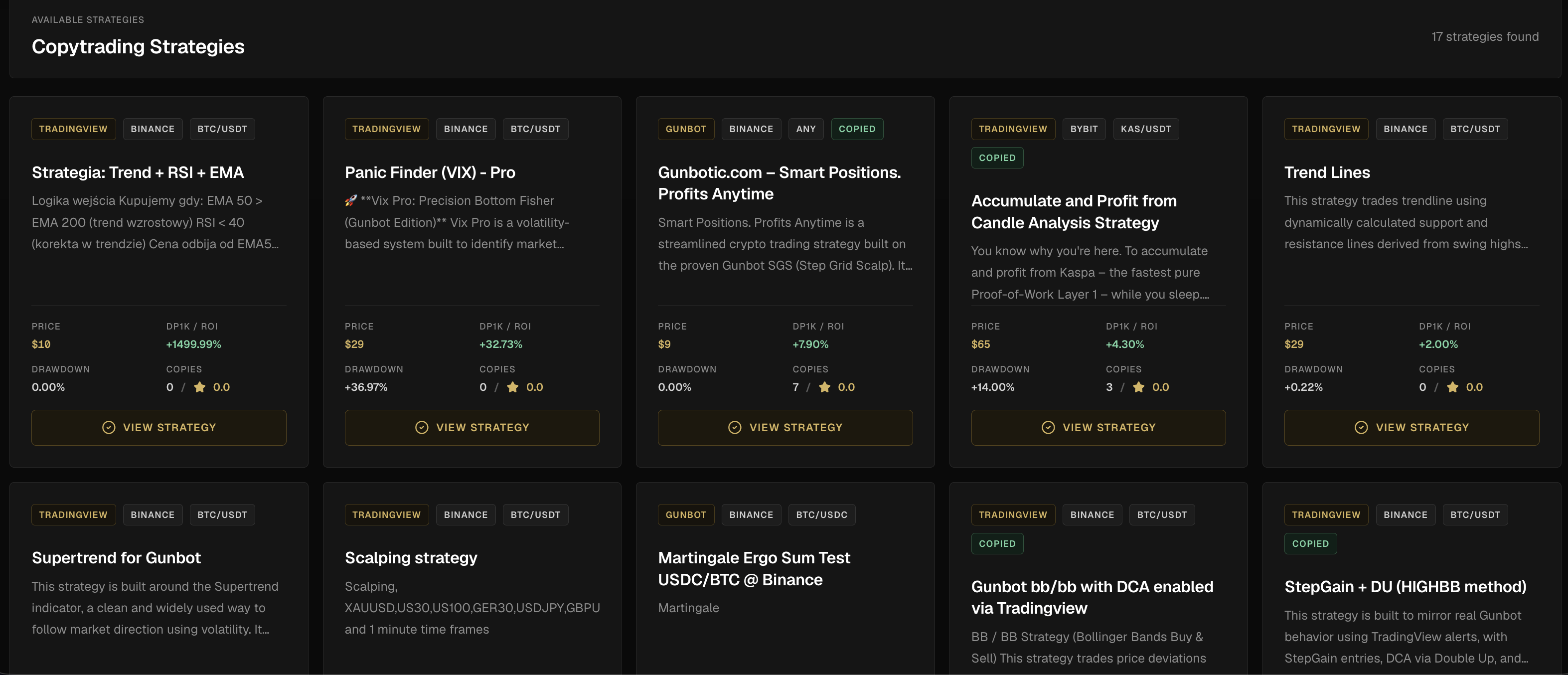
Copy trading in Gunbot Live covers strategy marketplace review, provider details, signal history, purchases, plans, and copied workflow management when the module is enabled and configured. It still requires careful risk review because access, historical signals, or copied settings do not guarantee suitability or profit.
Copy trading can amplify someone else's mistakes. Verify strategy behavior and account fit before using live capital.
What This Feature Does
Copy trading is easier to judge when the strategy information is visible before you commit. When copy trading is available for your setup, you can review leaders, provider detail, signal history, purchase state, plan information, and recent activity before deciding whether the workflow fits your account.
Important Differences
| Concept | Meaning |
|---|---|
| Copying settings | Using another configuration or preset as a starting point. |
| Following signals | Reacting to strategy signals from a provider or source. |
| Account mirroring | Full account-level copying, which carries broader risks and is not the same as reviewing a strategy. |
Risks
A copied strategy can be unsuitable for your account size. Signals may be delayed, missed, or affected by exchange conditions. Provider results may not match your fees, liquidity, or execution. You remain responsible for risk and configuration.
Trading Reality
It gives Gunbot a browser workspace for monitoring, strategy work, backtesting, risk review, history, and exchange-connected operations. These pages explain what the product does. Your account data stays on your local trading bot, behind login.
Operational Limits
The dashboard depends on the connected Gunbot instance, the exchange API, and the network between them. It can make problems easier to notice, but it does not remove market risk or take responsibility away from you: exchange permissions, strategy settings, open orders, and capital allocation still need your review.
Plain Definition
Copy trading is the practice of using another strategy, provider, or signal workflow as part of your own trading operation. It can save research time, but it also imports someone else's assumptions, market fit, risk tolerance, fees, execution delay, and failure modes.
Marketplace Due Diligence
Before buying or following a marketplace strategy, read the description, market assumptions, signal history, drawdown, pair, exchange, timeframe, and market type. Understand whether it is a one-time purchase, plan, or signal service, whether it needs a specific account size or liquidity profile, and how to stop copying before capital is involved.
Payments And Subscriptions
A professional copy trading marketplace should make purchase state visible: what strategy was bought, which access is active, what the license or order reference is, when payment was confirmed, and what support information you receive. Payment success does not mean strategy suitability.
Copy Trading Failure Modes
Copy trading can fail even when the provider looks good. A signal can arrive late or not at all, the provider may trade with different fees or liquidity, your exchange or pair mapping may differ, copied exposure can grow during a drawdown, and past provider results are not future guarantees.
External references
- Gunbot Unlimited CopyTrade Hub context: Official context for copy trading support, strategy marketplace behavior, and subscription-aware workflows.
FAQ
Can copy trading lose money?
Yes. Copy trading can copy bad decisions, unsuitable risk, or strategies that stop working under new market conditions.
Should I review signal history before buying?
Yes. Review strategy description, signal behavior, market assumptions, pair, exchange detail, and risk before subscribing or copying.
What should be visible before buying a copy trading strategy?
At minimum: strategy name, provider or leader details, description, price and terms, signal history, relevant badges, and risk warnings.
Does copy trading remove the need to understand strategy settings?
No. You still need to understand market type, sizing, risk, stops, exchange compatibility, and how to disable the workflow.
Last updated: