
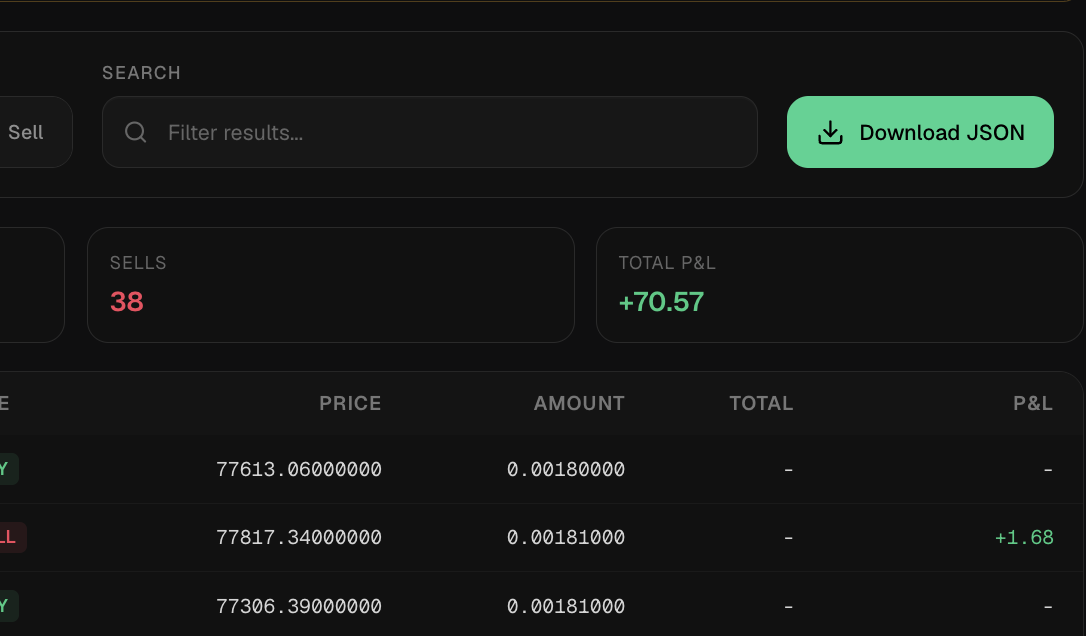
JSON exports help you move trading history, fills, and order records into accounting or tax preparation workflows. They can preserve pair-specific evidence and help you compare bot records with exchange statements, but they do not provide tax advice.
What This Feature Does
In practice, it exports trading history records when present. It helps you isolate relevant pair, exchange, and time-range data. It supports review workflows for accounting, support, and tax preparation.
Example Workflow
You filter trading history by pair and date range, download the records, store them safely, and share them with tax software or a qualified professional if needed.
Limitations
The limits matter: Tax rules vary by jurisdiction. Exchange history, Gunbot history, and accounting tools may classify events differently. Exported files can contain sensitive trading information.
Trading Reality
It gives Gunbot a browser workspace for monitoring, strategy work, backtesting, risk review, history, and exchange-connected operations. These pages explain what the product does. Your account data stays on your local trading bot, behind login.
Operational Limits
The dashboard depends on the connected Gunbot instance, the exchange API, and the network between them. It can make problems easier to notice, but it does not remove market risk or take responsibility away from you: exchange permissions, strategy settings, open orders, and capital allocation still need your review.
Plain Definition
Tax downloads are structured exports of trading activity that help you preserve records for accounting, tax software, support, or personal audit. They do not decide tax treatment; they make the raw history easier to collect and review.
What A Useful Export Should Include
A useful export should carry enough detail for review without exposing more than needed: pair, exchange, market type, side, timestamp, price, amount, value, fees, order or fill IDs when available, realized PnL when calculable, and only the selected scope when the request is pair-specific.
Record Hygiene
You should export records regularly, store them safely, avoid mixing unrelated pairs when sharing support files, and compare bot exports with exchange statements before final accounting decisions.
Privacy Reminder
Trading history can reveal strategy behavior, account size, asset preference, exchange usage, and timing. Downloads should be treated as sensitive files even when they do not contain API credentials.
FAQ
Is this tax advice?
No. It is a data export workflow. You should consult qualified tax professionals for tax treatment.
Can I download only one pair?
The intended workflow is to export the selected or filtered history rather than unrelated pairs.
Can a tax download replace professional tax advice?
No. It is a data export. Classification, jurisdiction, cost basis method, and reporting obligations require you or a qualified professional.
Why is pair-specific export important?
It reduces unnecessary data exposure and makes support or accounting review faster when the problem concerns only one market.
Last updated: